
Was ist ein VPN und wie funktioniert es?
Viele Menschen haben den Begriff „VPN“ schon gehört, können ihn jedoch nicht genau einordnen. Genau hier setzen wir an: Auf dieser Seite finden Sie eine verständliche Einführung in die wichtigsten Grundlagen.
Digitale Sicherheit, Privatsphäre und freier Zugang zum Internet sollten keine Fachthemen sein, sondern für alle nachvollziehbar bleiben. Deshalb erklären wir klar und praxisnah, wie ein VPN funktioniert und wofür es eingesetzt wird.
Ein VPN erhöht den Schutz Ihrer Internetverbindung, verschleiert Ihre IP-Adresse und verbessert damit Ihre Online-Privatsphäre. Zusätzlich kann es – je nach Anbieter – ermöglichen, auf Inhalte zuzugreifen, die regional eingeschränkt sind.
Ursprünglich wurden VPNs vor allem im geschäftlichen Umfeld genutzt, etwa für sichere Firmenverbindungen. Heute stehen zahlreiche Dienste auch privaten Nutzerinnen und Nutzern zur Verfügung. Angesichts der wachsenden Bedeutung digitaler Kommunikation ist zusätzlicher Schutz sowohl im Berufsalltag als auch im privaten Bereich sinnvoll.
Das Internet bietet enorme Möglichkeiten – aber auch Risiken. Ein VPN kann dabei helfen, Ihre Geräte und Ihre persönlichen Daten besser zu schützen.
Was ist ein VPN und wie funktioniert es?
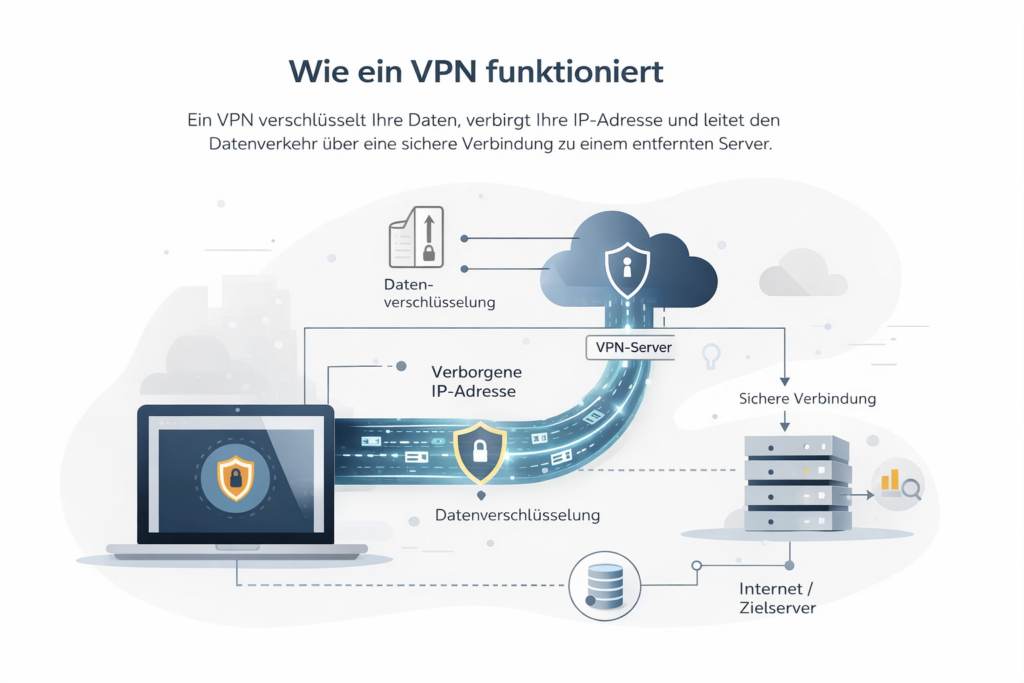
Ein virtuelles privates Netzwerk (VPN) ist ein Dienst, der Ihre Internetverbindung zusätzlich absichert. Es stellt eine geschützte Verbindung zwischen Ihrem Gerät und dem Internet her und erhöht so Ihre digitale Privatsphäre.
Im Kern erfüllt ein VPN zwei zentrale Aufgaben:
Verschlüsselung des Datenverkehrs – Ihre übertragenen Daten werden verschlüsselt, sodass Dritte sie nicht ohne Weiteres mitlesen können.
Verbergen der IP-Adresse – Ihre echte IP-Adresse wird durch die Adresse eines VPN-Servers ersetzt. Dadurch wird Ihr tatsächlicher Standort weniger leicht nachvollziehbar.
Diese Kombination erschwert es Websites, Internetanbietern oder anderen Akteuren, Ihre Online-Aktivitäten detailliert nachzuverfolgen.
Zugriff auf internationale Inhalte
Da ein VPN Ihre IP-Adresse ändern kann, erscheint es so, als würden Sie sich in einem anderen Land befinden. Dadurch können – je nach Dienst – geografische Einschränkungen reduziert werden. So lassen sich beispielsweise internationale Mediatheken oder bestimmte Online-Inhalte abrufen, die regional unterschiedlich verfügbar sind.
VPN-Protokolle einfach erklärt
VPN-Protokolle bestimmen, wie Daten zwischen Ihrem Gerät und dem VPN-Server übertragen und verschlüsselt werden. Sie regeln unter anderem:
die Art der Verschlüsselung
den Schlüsselaustausch
die Stabilität und Geschwindigkeit der Verbindung
Hier ein Überblick über gängige Protokolle:
WireGuard
Ein modernes Open-Source-Protokoll, das für hohe Geschwindigkeit und Effizienz entwickelt wurde. Es gilt als schlank, leistungsstark und sehr sicher.
OpenVPN
Ein etabliertes Open-Source-Protokoll mit starker Verschlüsselung (u. a. AES-256). Es bietet hohe Sicherheit und Flexibilität, ist jedoch meist etwas langsamer als WireGuard.
IKEv2/IPsec
Besonders beliebt bei mobilen Geräten, da die Verbindung bei Netzwerkwechseln schnell wiederhergestellt wird. Es kombiniert gute Geschwindigkeit mit solider Sicherheit.
L2TP/IPsec
Ein älteres Tunnelprotokoll, das in Kombination mit IPsec verwendet wird. Aufgrund der doppelten Kapselung kann es langsamer sein und wird häufig in Unternehmensumgebungen eingesetzt.
Proprietäre Protokolle
Einige Anbieter entwickeln eigene Protokolle zur Leistungsoptimierung. Diese basieren oft auf bestehenden Technologien, werden jedoch spezifisch angepasst.
Beeinflusst ein VPN die Geschwindigkeit?
Da ein VPN Ihren Datenverkehr verschlüsselt und über einen zusätzlichen Server leitet, kann es zu leichten Geschwindigkeitseinbussen kommen.
Wie stark diese ausfallen, hängt von mehreren Faktoren ab:
gewähltes Protokoll
Entfernung zum VPN-Server
aktuelle Serverauslastung
Qualität Ihrer Internetverbindung
Mit modernen Protokollen und gut ausgebauten Servernetzwerken sind die Unterschiede im Alltag jedoch häufig gering.
Wie wir VPN-Dienste bewerten
Unsere Bewertungen basieren auf einer unabhängigen Analyse mit Fokus auf die Schweiz.
Wir prüfen:
- Sicherheit & No-Logs-Richtlinie
- Schutz vor IP- und DNS-Leaks
- Geschwindigkeit & Serverstandorte (inkl. CH/EU)
- Streaming- & P2P-Eignung
- Bedienbarkeit auf allen Geräten
- Transparente Preise & Garantien